

Duration
February 2025
Role
Experience designer
Product focus
Hyperpersonalisation, calorie intake tracking, wellness
Tools
Figma
I've been tracking my nutrition for several years now, using either Notes app or calculator. which makes it quit4e clear that I do need a way to track my calorie input, but it needs to be a simple one - something I can't achieve with most available nutrition tracking apps. So this project is an attempt to solve a problem for a user I know very well - myself, and give the user a simplified calorie tracker that feels iOS native, something that feels like a natural extension of the main device experience. At the same time, this is an attempt to imagine what hyperpersonalisation of UI in mobile apps might look like - because having a simplified option for the typical calorie tracker would increase the user base.
An experienced nutrition tracker who has moved beyond the beginner phase and established their own tracking habits. This user has internalized nutrition fundamentals. The app should be a calculator and logbook, not a companion or teacher.
• Someone with long history of tracking nutrition (7+ years)
• Has knowledge of basic nutrition, exercise, calorie expenditure,
• Knows how to manage weight based off my own characteristics and goals
• In a calorie counter app is not looking for advice, coaching, entertainment, socmed aspects - wants to log and go
• Prefers manual precise input because she is aware databases in popular apps can be either estimations or similar available foods, which can be drastically different in terms of calorie amount and therefore if logged as it will result in incorrect data input, skewing the stats
• Precise calorie and macro data for self-directed goals
• Fast, minimal-friction food logging
• Clear daily intake summaries
• Views tracking as a routine utilitarian task, not a learning experience
• Prioritizes speed and accuracy over feature exploration
• Wants to log intake and move on - minimal time in-app
While showcasing a "redesign" work on an established product from a major company would carry name recognition, my user is clearly not the target user for these apps. Therefore redesigning the existing product without access to actual user data would be based off speculation and creating for the wrong type of user.
Instead, I've grounded this case study in a real, validated problem: my own experience as a user of calorie tracking apps. Someone who would clearly benefit from having a dedicated space to store my nutrition intake data, but in a much simpler way compared to what modern calorie tracking app scene has to offer.
Personalization design's most challenging aspect: optimizing for a specific use case while respecting established patterns that ensure usability.
As someone who tracks macros and calories (and have for over a decade, establishing my preferences and rhythm), I've struggled with most available calorie tracking apps becasue of the following issues:
Most commercial apps position themselves as coaches, motivators, and educators rather than simple tracking tools. Packed with multi-level navigation, educational content, recipe generators, and motivational features, which are more often than not hidden behind a paywall after taking up preciouos screen space.
This creates friction in the initial stage of using the app when eyes are getting used to locating the only feature the user needs among a rich UI. For this user, who simply needs to log food, monitor daily intake, and rarely review their macro breakdown, cognitive load on opening the app is increased to the point they revert back to using Notes becasue I spend too much effort navigating through layers of features I don't need just to access basic tracking functions.
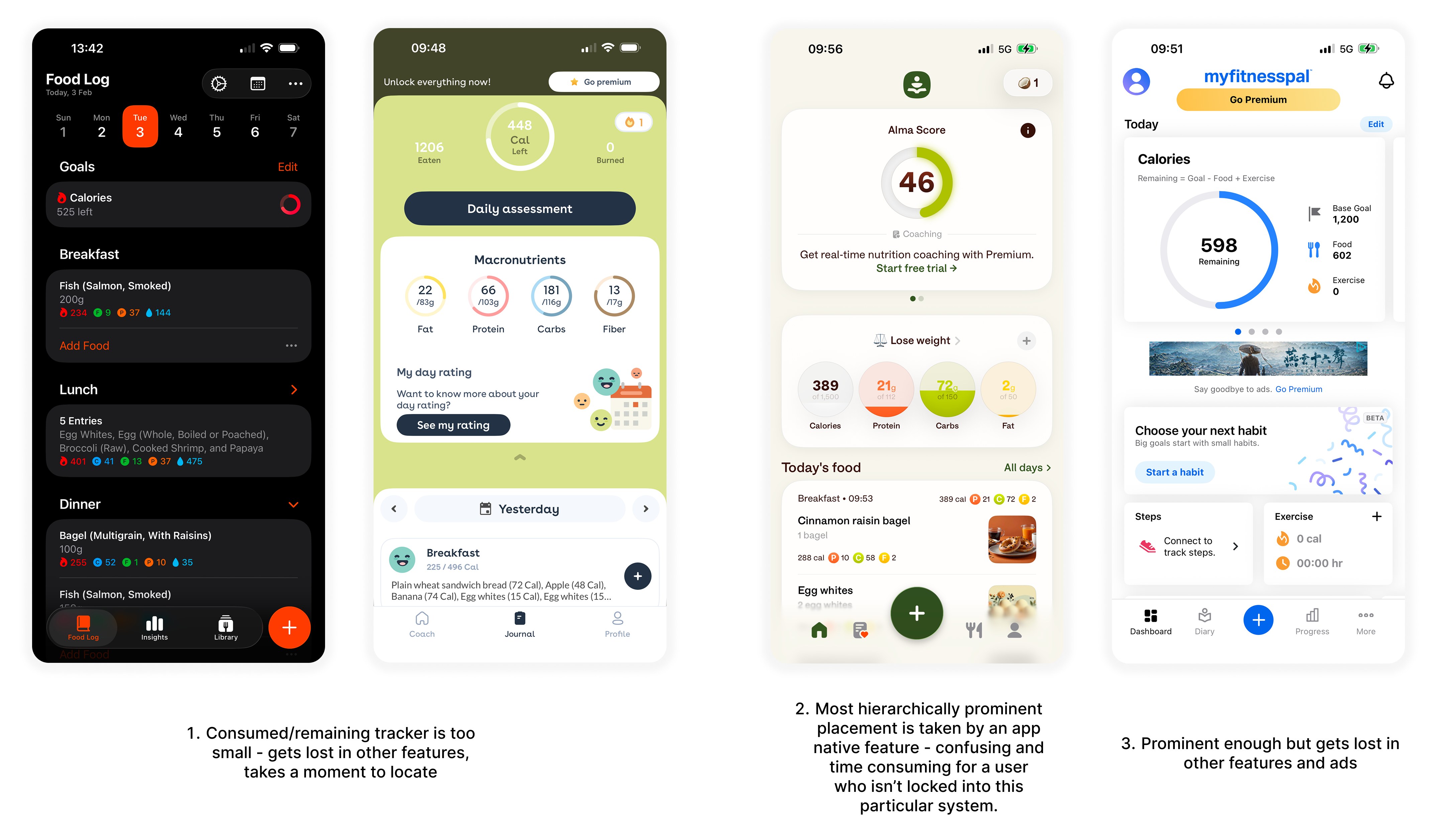
• Core tracking functions at the top level
• Quick access to essential settings - no individual parameter setting while logging food
• Streamlined feature set focused on data entry and review
• Clean iOS look to feel inside of the overall device experience

Most apps assume users are starting their nutrition tracking journey for the first time. This shows up in verbose instructional copy, frequent health warnings, motivational messages, and educational tooltips that occupy valuable screen space.
As someone who's tracked nutrition for years, these elements feel redundant - I've internalized this information long ago and don't need it repeated every time I log a meal, neither I am looking for coaching. Commentary on the type of foods I consume, whether it's "junk food" or healthy, is not a needed function either.
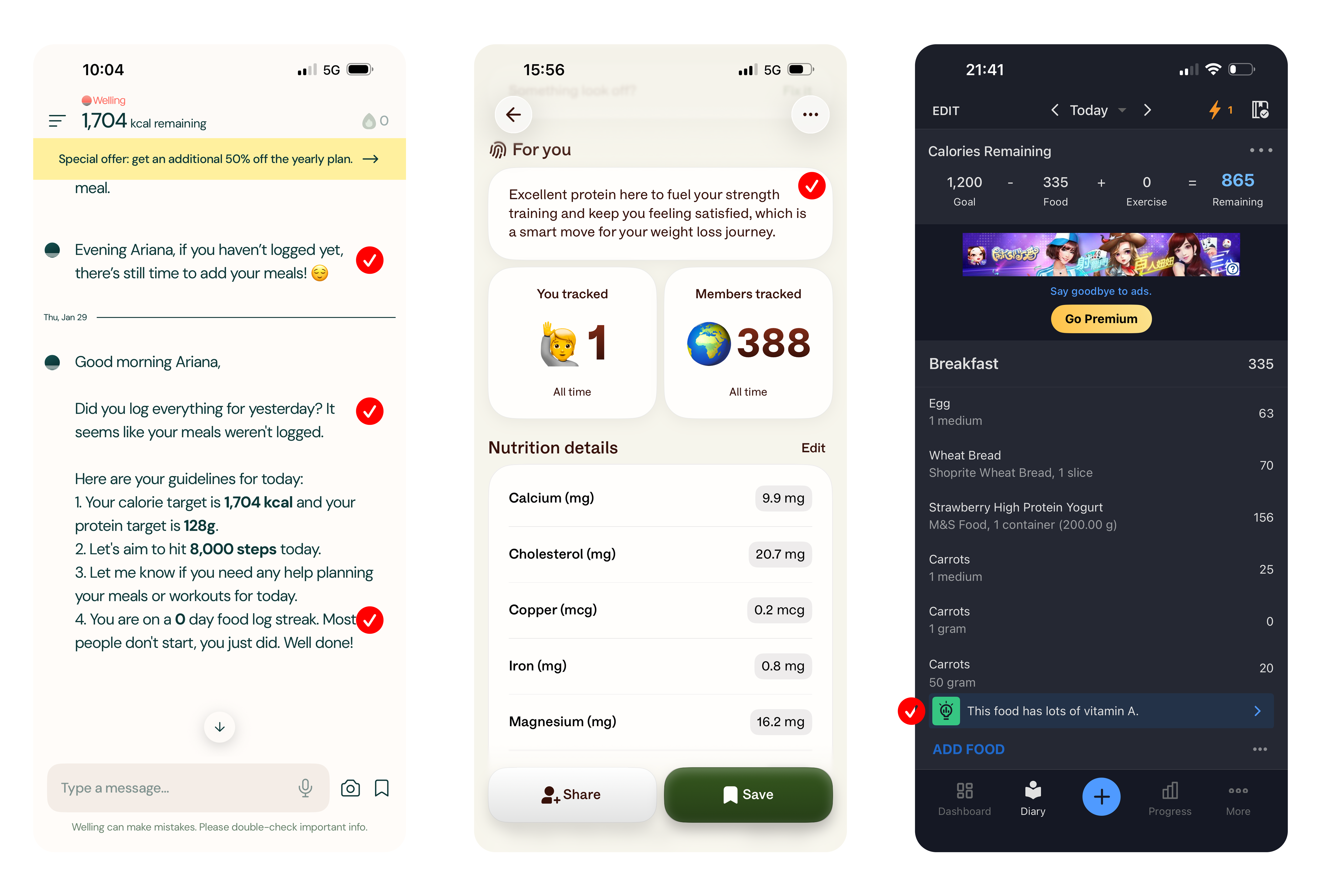
• Clean, functional copy
• No motivational prompts
• No repeated warnings
• Minimal information density that gets me to my goal and allows to go on with my day
Possibly themost tedious part of the process - having to tell the app how much you consumed, especially if the app has a drop down menu of all options all at once. Oftentimes defalut measurement settings such as a cup, a serving, or 1 piece, are a challenge since this is not how I measure my food, and yet every time I have to scan the drop down menu for my preferred measurement unit.
While apps do offer a variety of measurement units, which seems like a plus on the surface, I would like to be able to set my preferred unit under settings once and not have to scan through a lengthy menu every time I log a food.
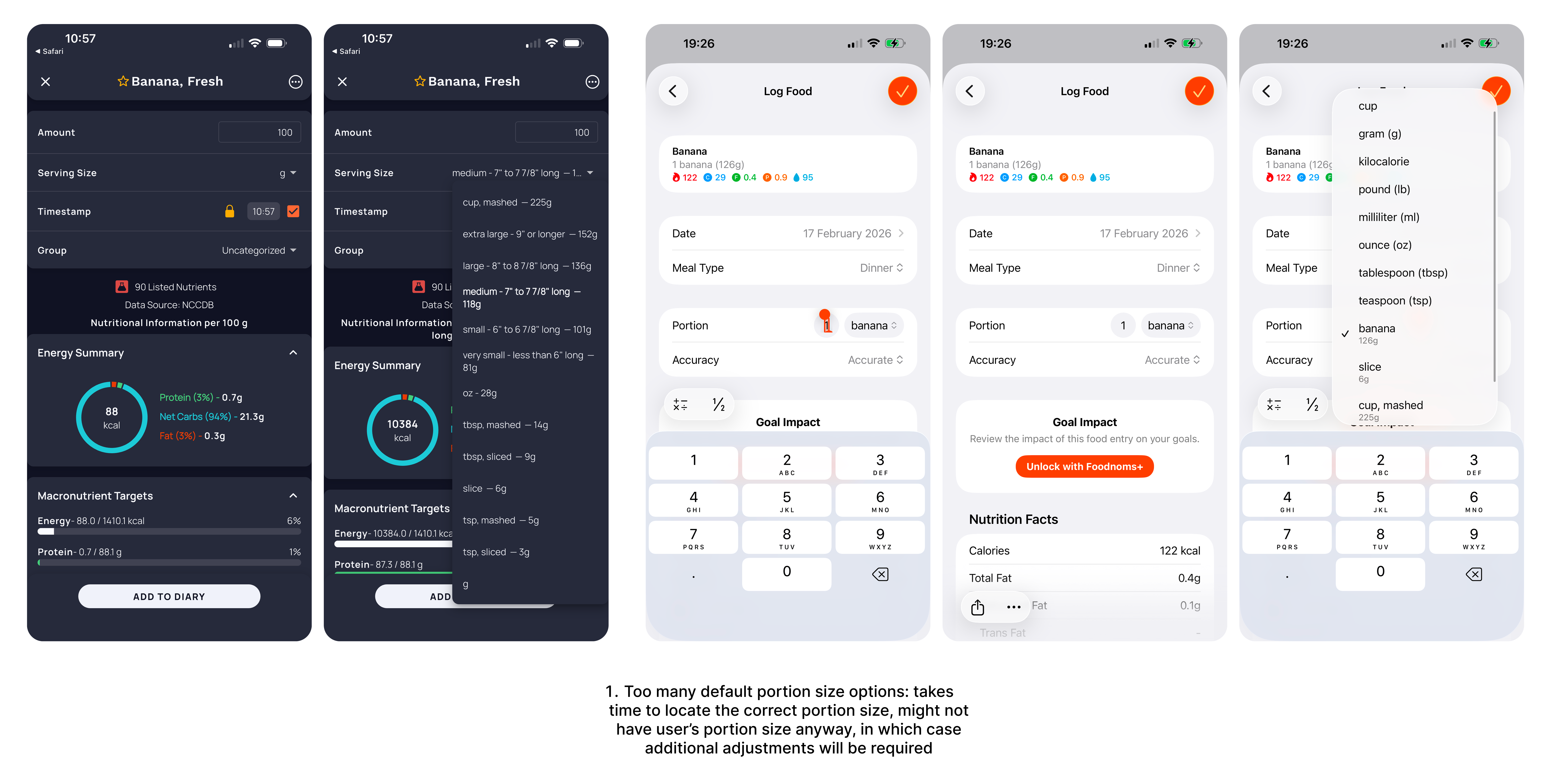
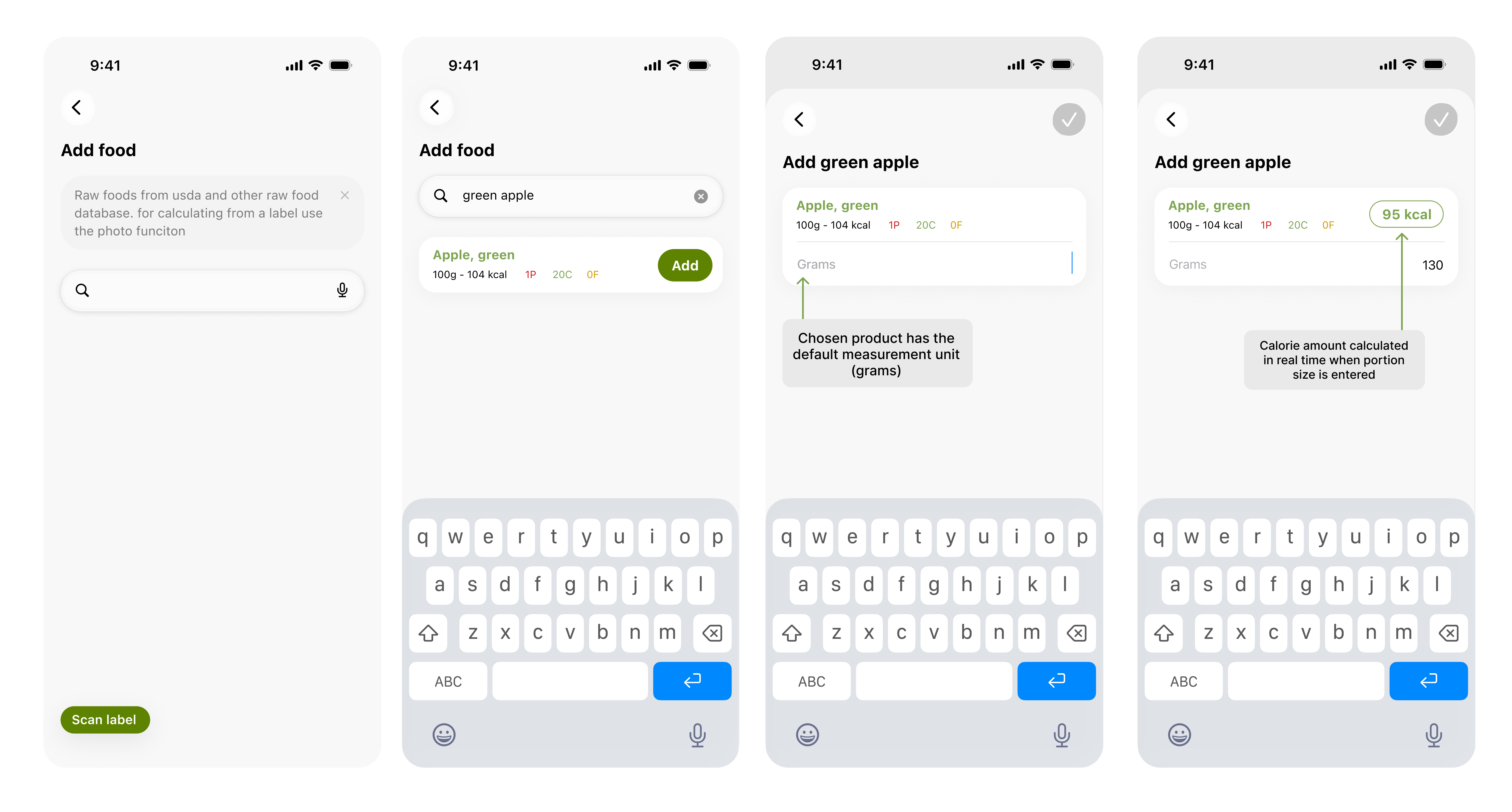
• The ability to quickly input foods by weight (in grams) with real-time calorie calculations based on verified databases
• Portion-based estimates and "average serving" suggestions should be secondary options, not the default
Many apps are designed to maximize time spent in-app through social features, recipe libraries, coaching modules, and educational content, which creates a fundamental mismatch with my actual goal: I want to log my intake as quickly as possible and get back to my day. Calorie tracking is a utilitarian task just like brushing my teeth or washing my hair, not a destination experience.
• A minimal interface focused on speed quick food entry
• At-a-glance analytics
• User's priority function at the top of hierarchy
• The app as a natural extension of the device experience, not a platform competing for attention
Many apps prominently feature AI-powered photo scanning that claims to identify foods and calculate calories from images. In practice, this technology isn't accurate enough for users who need precise tracking. It frequently misidentifies foods or misjudges portion sizes.
Generic disclaimers like "AI may make mistakes" don't solve the problem, they just acknowledge the feature isn't a ready product (I am waiting for the day it can be as accurate as manual input though, it would be a real time saver).
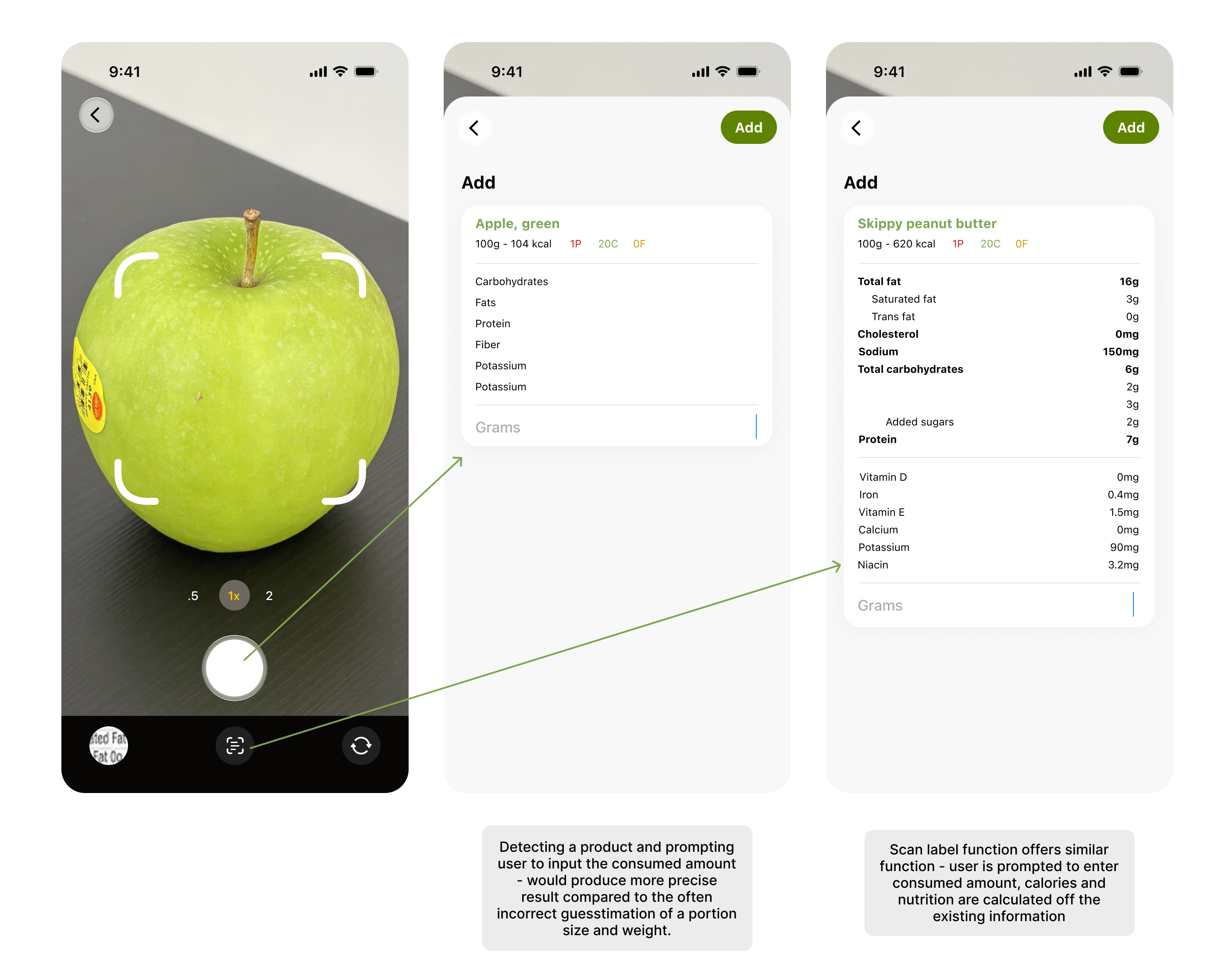
Photo scanning does have a legitimate use though: capturing nutrition labels and calculating the consumed amount and nutritional input based on the product's official data.
It's both practical and accurate, AND actually allows to input info for the exact brand of peanut butter I've had, not an alternative from a diff part of the world with different nutrition values.
• Repositioning photo scanning as a label calculator rather than a meal analyzer
• Setting appropriate expectations by presenting it as a tool for packaged foods, not a shortcut for estimating homemade meals or restaurant dishes
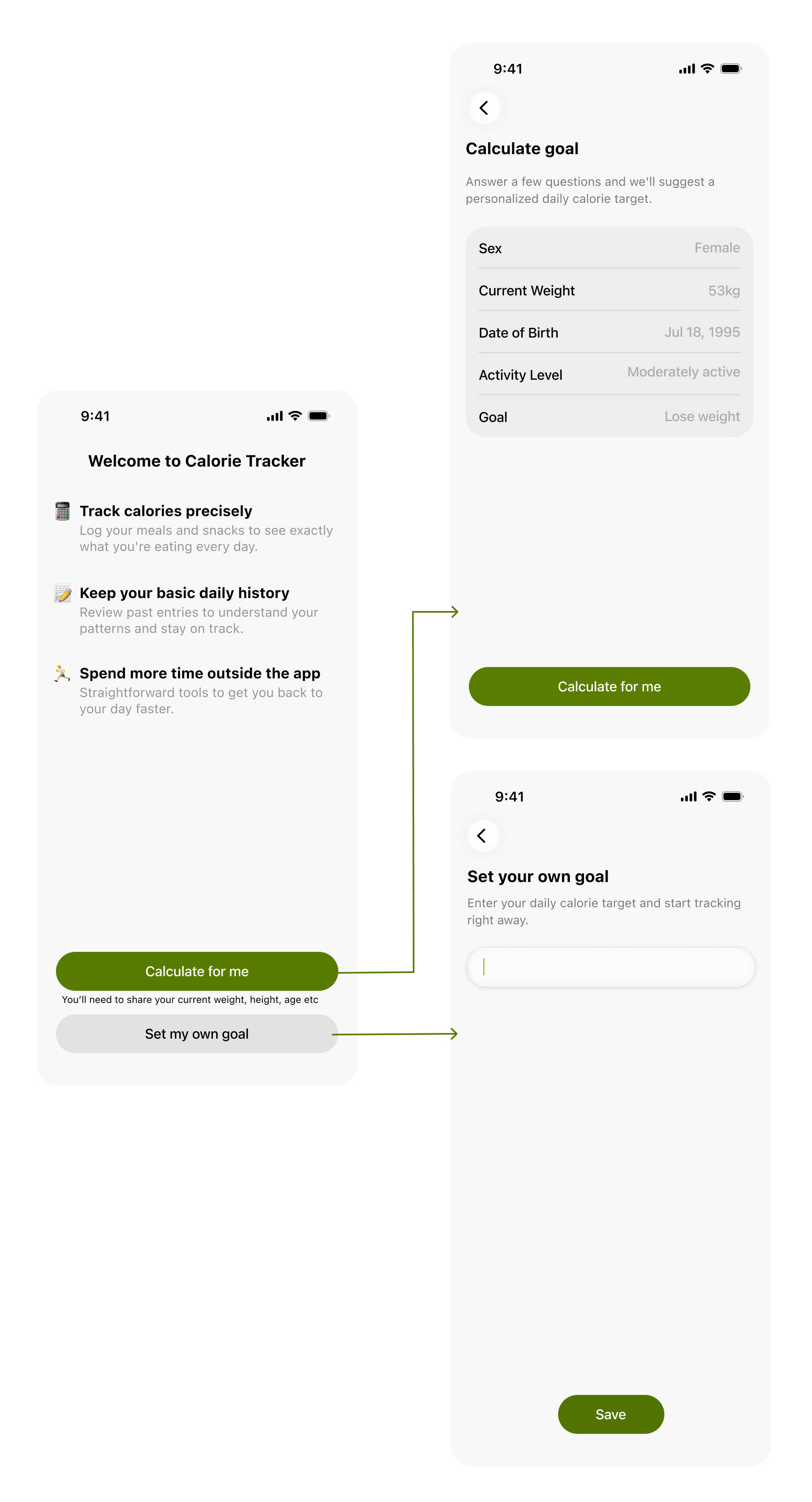
Users can choose between two paths: inputting their own daily calorie target or using the app's calculator.
This distinction is critical but rarely offered in existing apps, which typically funnel all users through lengthy questionnaires that go above and beyond asking for the information necessary to calculating a BMI. Being asked more than my age, weight, activity level, and general goal (losing/maintaining/gaining) when prescribing a calorie limit is unnecessary data handover at the least and not something that contribues to the user's intended app usage style at worst.
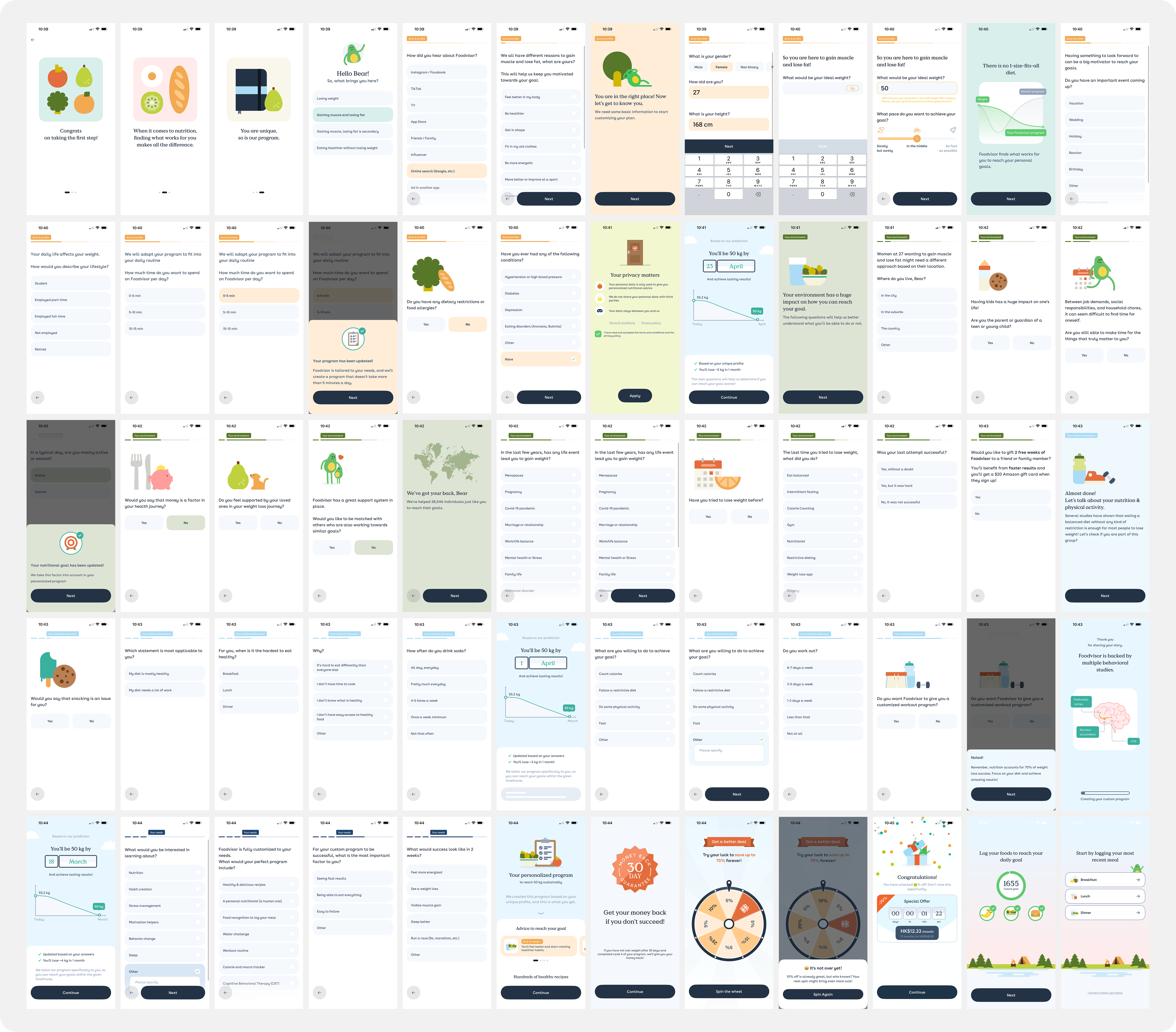
FoodVisor's 58 step onboarding (not including animated sequences). While it's obviously not targeting my type of user, it's hard to avoid trying it as it's one of the top recommended apps for the purpose. Still, 58 stepsmight seem a bit excessive unless you are using the app as your primary nutrition coach.
Additionally, for experienced trackers who already know their targets whether from working with a nutritionist, following a specific protocol, or years of self-mastery, these questions are unnecessary friction. For a user who simply wants to track calories, this is, in simple words, a waste of time.
By offering a simple one page BMI calculating solution, the app would allow users to save time and signal that the app trusts them to know what they're doing, and getting them tracking immediately.
Accurate calorie tracking requires trustworthy data sources, but most apps fall short. While commercial products like Starbucks lattes pull relatively accurate information from brand databases, the nutritional data for whole foods and raw ingredients is often inconsistent.
Some apps include multiple databases, leaving users overwhelmed with options. I've seen products that don't specify which database they use, offering a vague disclaimer instead: "tell it what you ate, and AI will magically calculate the amount" (yes, with this exact phrasing). This approach provides little transparency about the data sources or AI methods being used.
Other apps go to the opposite extreme and offer too many sources - even something as simple as "carrot" can return multiple entries. For pre-packaged foods, apps often struggle to identify the specific product a user has, especially across different countries. This makes barcode scanning more reliable, but even when a scan finds a match, like a cinnamon raisin bagel, I've encountered cases where multiple matches appear with different brands and therefore different nutritional information, making the whole process unreliable unless the user accepts their nutritional input will be skewed in favor of simply logging a similar item for the purpose of tracking what exactly they ate, rather than nutrition inside that product.


You will remember how it made you feel